Introducing Schema Radar: Ask a Question, the Tables Light Up Before You Finish Typing
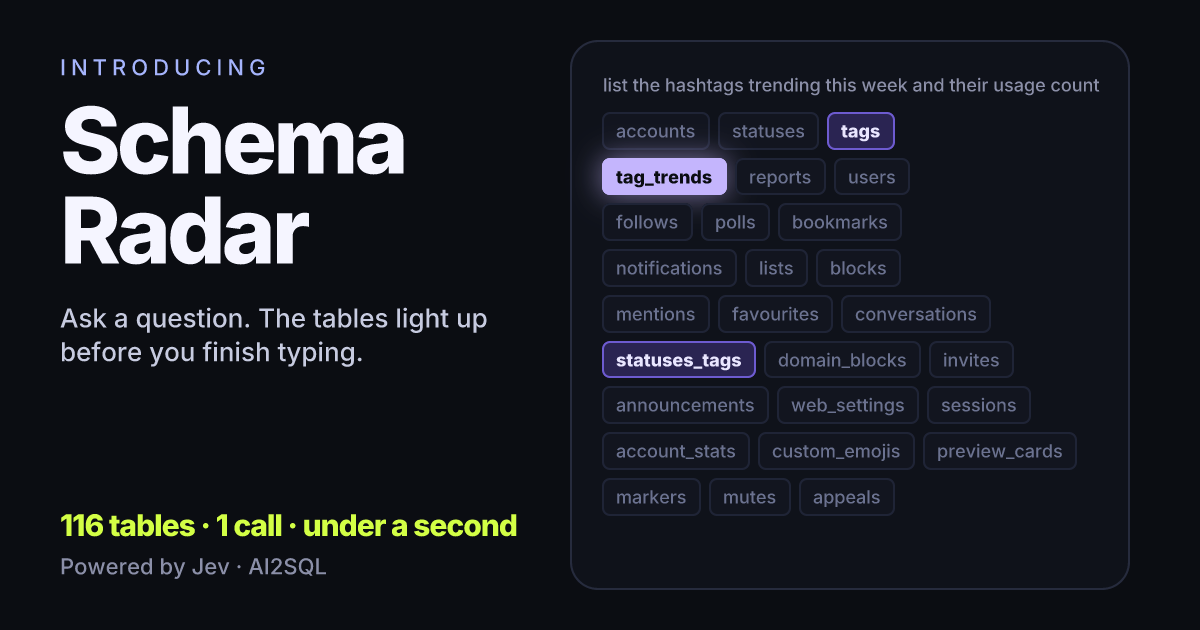
We put TypeSafe's Jev in front of a database schema. Type a question about Mastodon's 116 tables and the right ones light up in under a second, moving under the cursor while you are still typing. Then every column is x-rayed for personal data, and the SQL is written. Free, no account, only table and column names ever leave your browser.
Try Schema Radar → Pick Mastodon, Discourse, Cal.com or WordPress, or paste your own schema.
The hardest part of text-to-SQL is not the SQL
On a real database the query is the easy part. The hard part is deciding which four of three hundred tables matter. Send the whole schema to a language model and you pay for a huge prompt, wait for it, and hand the model more ways to pick the wrong table. Send too little and the query cannot be written at all.
That decision is a selection, not a piece of writing. It has a fixed answer space: the tables you have. Which makes it exactly the kind of question Jev, TypeSafe's System One model, was built to answer. Jev never writes text. You give it something to read and a list of options, and it gives back a probability for each option in a single pass.
Schema Radar is that idea as a page you can type into.
What it does
1. Ask, and watch the tables move. Choose a schema and type. Every pause, and at least every 900 milliseconds while you type, the page asks Jev again. “which u” lights users. “users posted” hands it to statuses. “in the last 30 days” settles it. Each answer is one call, and on Mastodon's 116 tables it comes back in well under a second, so the ranking changes under the cursor instead of after the sentence.
2. Write the SQL. Pick a dialect and the question goes to AI2SQL's generator together with the columns of the tables Jev chose. The query appears on the same page in a few seconds. Jev decides which tables; a language model writes the SQL. Each does the part it is good at.
3. X-ray the columns. One click asks Jev, for every column in every table, what it most likely holds: an email, a phone number, a name, an address, an IP, a credential, card data, health data, or none of those. All 1,016 columns of Mastodon come back in about eight seconds, and the summary is a card you can share.
How the table ranking works
The obvious design is one yes/no question per table, asked in parallel: “does this question need orders?” We built that first, and on a realistic schema it falls apart. Asked in isolation, “does this revenue question need sandbox_orders?” is a reasonable yes, because nothing in the request says a better orders table exists. Independent questions can judge; they cannot rank.
So Schema Radar asks a single Choice whose options are all the tables, each described by its column names. Jev normalises the probabilities across every option in one pass, and the result is a ranking:
question = {
    "type": "choice",
    "instructions": "Which table is most essential to answer the question with SQL?",
    "criteria": {name: f"columns: {cols}" for name, cols in TABLES.items()},  # up to 255
}
ranked = sorted(ask(f"Question: {QUESTION}", {"table": question})["table"]["probabilities"].items(),
                key=lambda kv: -kv[1])
On a 56-table schema with tables like sandbox_orders and invoices_legacy added on purpose, the single Choice kept the required tables at a median rank of 3. One yes/no per table pushed them to rank 22.5, at ten times the tokens. The full measurement, with the questions and the code, is in Jev for SQL: what we measured.
Two things follow from the design. Do not threshold. The winning tables for a hashtag question come back at 0.43, 0.28 and 0.27, because the probability mass is split among the tables you need; a 0.5 cutoff would discard all three. Keep the top few. And a Choice caps at 255 options, so for Discourse's 384 tables the page shortlists by matching table and column names against the question before Jev sees them.
What we measured
Everything below is from live runs on the public page, recorded on 22 September 2026 from Turkey, with a reused HTTPS connection. Your numbers will vary with distance to TypeSafe's servers.
| Step | Schema | Calls | Time |
|---|---|---|---|
| Rank the tables for one question | Mastodon, 116 tables | 1 | 0.2 to 0.8 s per answer |
| A whole sentence, typed | Mastodon | about 5 | the ranking updates while you type |
| Write the SQL from the top 3 tables | Mastodon | 1 (language model) | 2.5 to 3.7 s |
| X-ray every column | Mastodon, 1,016 columns | 116, one per table, 6 at a time | 7.1 to 8.1 s |
| X-ray every column | WordPress, 133 columns | 18 | 1.4 s |
The x-ray found 48 to 51 personal-data columns in Mastodon across runs: 24 credentials (encrypted_password, otp_secret, reset_password_token…), 13 to 15 names, 6 IPs and 5 to 6 emails. The count moves by one or two between runs because a few columns sit close to the line between two labels; the decision on the obvious ones never moved.
Only names leave your browser
A pasted schema is parsed on your machine. The page accepts CREATE TABLE statements from PostgreSQL, MySQL, SQLite and SQL Server, Prisma models, a Rails schema.rb, or plain table: col, col lines. What is sent to Jev is the table names and column names, nothing else: no rows, no types, no defaults, no constraints. Nothing is stored. A shared result is a link that carries its own numbers, so there is no record of your schema anywhere.
Where it is wrong
Jev is stable, and stable is not the same as right. In our tests the same question got the same top table every time; the probabilities drift by about 0.02 between runs, and the order of the options makes no measurable difference. But Jev cannot invent an option you did not list, and it can pick the wrong one from your list with full confidence, every time. Asked which dialect uses QUALIFY, it said SQL Server in every run. QUALIFY does not exist in SQL Server.
The x-ray inherits this. It is a guess from a column's name and the table it sits in. email, sign_up_ip and otp_backup_codes are easy. consumed_timestep in Mastodon's users table came back as a timestamp; it is an OTP counter. Treat the scan as a first pass that finds what a human would have found in an hour, in eight seconds. It is not an audit.
Why we built it
AI2SQL writes SQL from plain English on real databases. Choosing the right tables before writing is the step that decides whether the query is right, and until now it was done by the same language model that writes the query, on the whole schema, slowly. A model that answers “which tables?” in a fraction of a second, on every keystroke, changes what the writing step is given and how fast the whole thing feels. Schema Radar is the public version of that experiment. If the paste rate tells us people want it on their own databases, it goes into the product.
Frequently Asked Questions
What is Schema Radar?
A free page on builder.ai2sql.io where you pick a schema, or paste one, and type a question. Jev ranks every table by how much the question needs it, in one call, updating while you type. It can also label every column for personal data and write the SQL.
Does it see my data?
No. The schema is parsed in your browser and only table and column names are sent. Nothing is stored.
Why are the winning probabilities so low?
Because they are normalised across every table in the schema. Three required tables near 0.3 each is what a correct answer looks like. Keep the top few rather than applying a threshold.
What happens with more than 255 tables?
Jev's Choice takes at most 255 options, so the page first shortlists tables whose names or columns share a word with the question, then asks Jev about those. Discourse, with 384 tables, goes through this path.
Do I need an account?
No. Ranking, x-ray and writing the SQL all work without signing in. Running the SQL on your own database happens in AI2SQL and needs a free account.